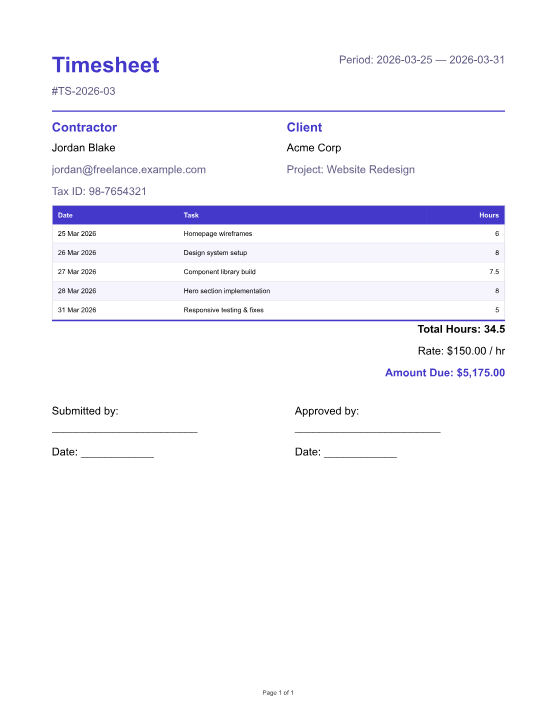
Pulp Engine is a self-hosted REST API that renderspixel-perfect PDFs, editable DOCX and PPTX,XLSX/CSV table exports, and cleanHTMLfrom a single template and a JSON payload.
A single typed AST feeds every renderer. PDF + HTML render with page-accurate fidelity; DOCX/PPTX ship editable Office files; XLSX/CSV export the template's table and pivot data. Edit the template once — every format follows.
02AI-native
Scaffold templates from a prompt.
dev"an invoice with line items, totals, and Net 30 footer"
→TemplateDefinition
typed · renderable · ready to refine in the editor
A shortcut for engineering teams, not end-user magic. POST /templates/generate uses schema-constrained Claude tool-use — because the template AST is a typed, strict discriminated union, the output is structurally valid by construction. Get a real starting point in seconds; iterate from there like any other code.
03No cloud tax
Start in production from USD $399/year.
✓Individual builders from USD $399/year for one production deployment
✓Team deployments typically start at USD $2,500/year
✓SaaS & Resale from USD $5,000/year — resell renders, still flat
✓12-month founding rate guarantee from first purchase
✓Direct access to the founder and early access to releases
✓Full product — no features held back for a paid tier
Flat pricing, no metered cloud in the path, and the full product from day one. Built for teams that want predictable cost and direct control. See pricing →
See it running
Same template. Every real format.
The editor on the left. The real PDF — embedded live, rendered by your browser. The real Word file, one click away. All from the same typed AST.
your-pulp-engine.internal/editor/
PDF
pay-stub.docx
10 KB · real binary · generated from the same typed AST as the PDF
Microsoft WordGoogle DocsApple PagesLibreOffice Writer
Shown as a file card, not a thumbnail — because a PDF-derived preview wouldn't be an honest representation of the DOCX file. The download above is the actual binary the engine produced.
Visual editor · drag-and-drop blocks · live multi-format preview
Try the editor →No install · 20 renders per 15-minute session · Real files out
Blocks panel
Every AST node type — text, table, chart, pivot, barcode, repeater, conditional — a drag away.
WYSIWYG surface
Handlebars bindings, live data, no "publish to preview" round-trip.
Every format, live
Tabs flip between HTML, PDF, DOCX, PPTX, CSV, XLSX — same template, pixel-perfect PDF, editable Office files.
The foundation
Your templates are code.
Every Pulp Engine template is a strictly-typed TemplateDefinition — a discriminated-union AST published on npm as @pulp-engine/template-model. Import the type, check it at build time, render it to six formats.
Template changes show up as structured diffs in pull requests — not opaque binary deltas like .rpt or .docx. Reviewers can read exactly what changed before it ships.
Lintable in CI
Validate every template against the published schema before it ever reaches a render server.tsc, vitest, your existing pipeline — the template is just TypeScript.
Programmatically generatable
This is why AI template generation is schema-valid by construction — Claude's tool-use emits against the same type. It's also why you can build template-generators, migrators, or transformers on top.
Build a real request
Try it against your deployment
No hosted demo — Pulp Engine is self-hosted, so the command below is a real one you can paste at your terminal once you've got the evaluation stack running. Edit the payload, pick a format, and copy.
Your instance — swap in a localhost or private URL.
curl
Expected response
Status
200 OK
Content-Type
X-Render-Duration-Ms
<server ms>
X-Render-Size-Bytes
<output size>
X-Request-Id
<uuid>
Body is the raw document bytes. Add "dryRun": true to the request body to validate the template without producing output — typically 5–50 ms.
Or in your language
Same call, every client. Kept in sync by a build-time test.
→ OpenAPI 3.0 spec at /docs/json
→ Typed clients for TypeScript (npm) and Python (PyPI)
→dryRun: true — validation in typically 5–50 ms (~80× faster than a full render)
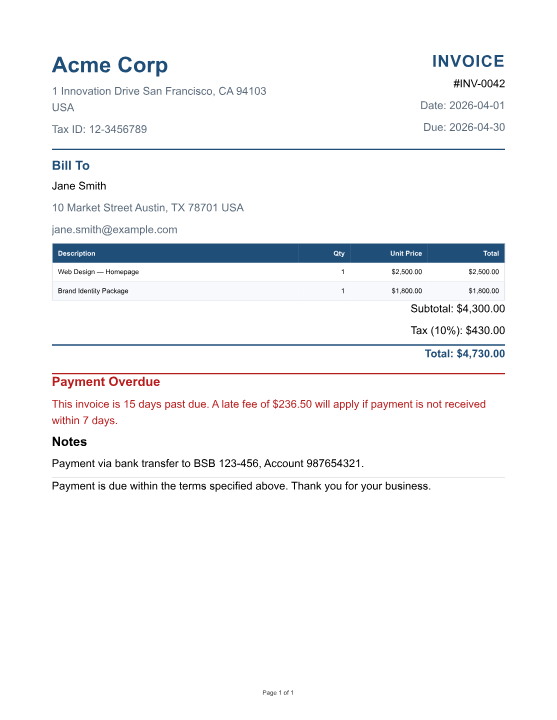
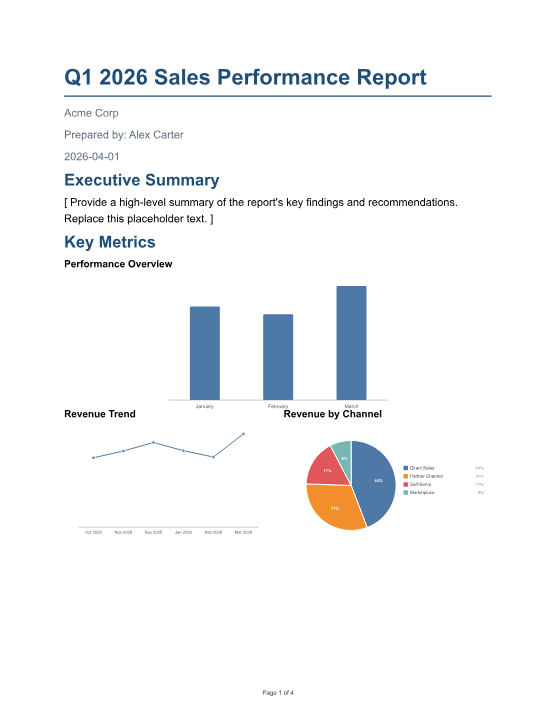
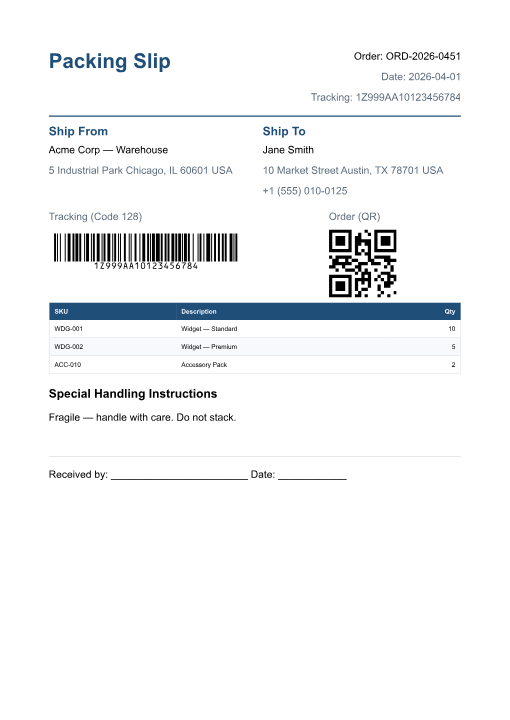
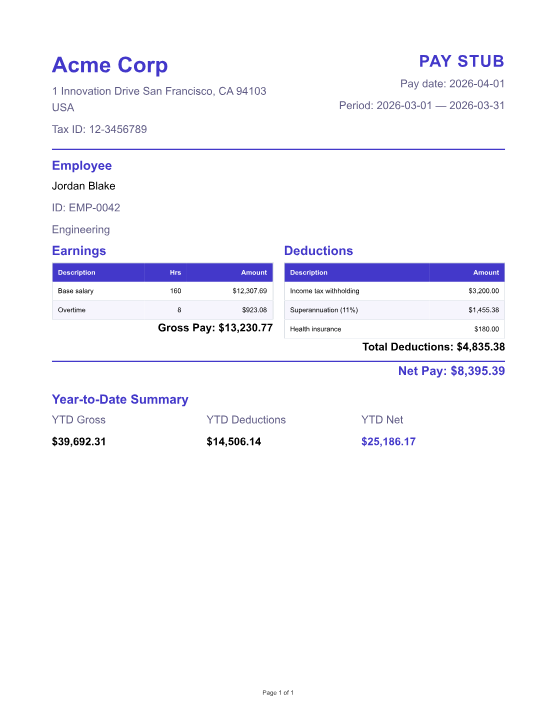
Every thumbnail below is the actual byte output of a starter-pack template — rendered by the engine itself and committed alongside the site, not designed in Figma.
Drop the full template editor into your customer's product as a custom element. CSP-gated via EMBED_ALLOWED_ORIGINS. No iframe wrestling, no forked forks.
05
Pick your blast radius
in-process
child-proc
container
socket
Four RENDER_MODE options — from fast in-process to a privilege-separated controller holding the Docker socket. In socket mode the API holds no Docker authority, and even a fully compromised API can't invoke arbitrary docker run. Read the threat model →
A proper plugin system — not just "custom helpers." Ship a typed plugin package and register custom node types, renderers, storage backends, auth providers, render hooks, or new routes at boot.
07
Barcodes & QR as first-class nodes
QRCode 128Code 39EAN-13UPC-AData Matrix
Six barcode types built in. Handlebars-capable payloads, pixel-accurate in PDF/DOCX/PPTX/HTML. Shipping labels and tickets without a plugin.
08
Schedules, delivery, and a DLQ
cron:0 8 * * MON
deliver:email · s3 · webhook
on-fail:/admin/schedule-dlq
Most tools stop at "returning a PDF." Pulp Engine includes cron-driven render jobs with email, S3, or webhook delivery — and a dead-letter queue for the failures you will have.
Every render emits phase-by-phase timings, an accounting header, and an OTel span. Wire it to Grafana / Datadog / Honeycomb and you'll see why a render was slow, not just that it was.
10
Bill your own customers per render
for SaaS builders
Postgres rollup
GET /usage?groupBy=day
GET /usage.csv
count · duration · bytes · pages · per tenant
Plugin event
on('render:completed')
{ templateKey, format, durationMs, accounting:{ outputSizeBytes, pageCount } }
Per-response headers
X-Render-Duration-Ms
X-Render-Size-Bytes
X-Render-Pages
If you're building a SaaS product on top of Pulp Engine, you get metered usage out of the box. Aggregate per-tenant render counts via the admin endpoints, stream every render into your own billing pipeline via the plugin event, or read accounting headers per request — whichever fits your stack. Pipe straight to Stripe Metering, Orb, Metronome, or a home-grown invoice job.
Note: the /usage rollup and render_usage table require a database-backed storage mode (Postgres or SQL Server). Plugin events and response headers work in every storage mode.
11
Safe to put in front of your customers
for SaaS & enterprise
Multi-tenant isolation
MULTI_TENANT_ENABLED=true isolates templates, assets, credentials, audit events, and schedules per tenant. Signed tenant claims in editor tokens, per-tenant asset-binary prefixing, archive enforcement — enforced at the storage layer, not bolted on.
OIDC / SSO
PKCE auth-code flow with auto-provisioning and silent refresh. Works with Okta, Azure AD, Keycloak, Auth0. New editors provision on first login — no shared service accounts, no manual account churn, no "enterprise tier" paywall.
The two features most document tools hide behind a "contact sales" button are just env vars here. Same binary, same licence — whether you're a solo builder or running customer templates across a hundred tenants.
dryRun: true
Validate + exercise expressions without producing bytes. Typically 5–50 ms — ~80× faster than a full render.
Pivot tables, built in
Cross-tab grouping as a first-class node — not a plugin, not a workaround.
POST /render/pdf/merge, /render/pdf/watermark, and /render/pdf/insert for post-render workflows.
Version history + labels
Every save is a version. Promote "stable" / "draft" / A-B variants without redeploying.
Batch rendering
Submit hundreds of renders, poll a job ID, stream results back. Async-friendly.
Named-user audit
Per-editor identity on every version, asset mutation, and mint. GDPR-ready purge-by-actor.
Swappable storage
Postgres · SQL Server · file-backed — one env var. S3 for asset binaries.
What makes Pulp Engine different
Most document generation tools were designed for a different era — desktop designers, per-seat licenses, or SaaS black boxes. Pulp Engine is built for modern product teams.
Authoring in a browser, not a desktop IDE
Browser authoring beats desktop-only tooling
Many legacy report designers still assume a desktop install. Pulp Engine's editor is a modern React SPA that ships inside the product. Template authors open a URL — no install, no license keys, no dev VMs. And authors can be gated with OIDC, not passed around as shared service accounts.
Your data never leaves your network
DocRaptor, APITemplate, PDFMonkey — great, until compliance asks
Hosted PDF APIs are fast to adopt and slow to get past security review. Pulp Engine runs in your cluster, talks to your Postgres, logs to your observability stack, and never phones home. No DPA to negotiate.
Typed REST, not a framework lock-in
Works with your stack, not instead of it
Plenty of reporting stacks are libraries or framework controls first. Pulp Engine is just an HTTP API with an OpenAPI spec — call it from Rails, Django, Laravel, Go, or a shell script. The SDKs are convenience, not a runtime dependency.
Built for the AI era
Generate draft templates from a prompt
POST /templates/generate turns "an invoice with line items, totals, and a Net 30 dunning footer" into a real, schema-valid template in seconds — thanks to a structured AST and schema-constrained Claude tool-use. That workflow is still rare in legacy reporting stacks.
How we compare
High-confidence claims only. If another tool fits your team better, we'll be the first to say so.
Feature
Pulp Enginethis page
jsreport
DocRaptor
Carbone
Crystal Reports
Licence model
✓Commercial · free eval · one tier
Open-core / enterprise
SaaS subscription
Source-available (CCL) + commercial tiers
Commercial / per-seat
Deployment
✓Self-hosted by default
Self-hosted + cloud
✕Hosted API only
Cloud · Docker · on-prem
Desktop + SAP runtime
Output formats
PDF · DOCX · PPTX · XLSX · CSV · HTML
PDF · XLSX · DOCX · HTML · CSV
PDF · XLS · XLSX
PDF · DOCX · XLSX · PPTX · ODS · HTML
PDF + office exports
Template authoring
✓Browser editor + AI
Browser Studio (free tier: 5 stored templates)
HTML + CSS, BYO tooling
Word / LibreOffice / HTML
✕Windows desktop designer
API model
✓REST + OpenAPI 3.0
REST API + CLI
Hosted REST API
REST API + SDKs
.NET / Java runtime
OIDC / SSO
✓Built in (one tier)
$Enterprise tier
Cloud SSO
$Enterprise tier
Varies by host
SDK coverage
TS · Python
CLI · JS · Node · .NET · Java
Ruby · Node · Python · PHP · Java · .NET
Node · JS · Go · Python · PHP · Java · Rust
.NET / Java
Per-render fees
✓None
✓None (self-host)
$Usage-priced SaaS
$Usage-priced cloud
$Per-seat licensing
Based on official product pages and public docs, last reviewed June 2026. We omit claims we couldn't verify cleanly. Found drift?Email us — we'll fix it.
Make documents a feature, not a project.
Start with a free evaluation today. Paid production starts at USD $399/year.